Start here
Approve a complete example record: the artwork, printed barcode, encoded EPC and expected decoded identifier for the same item. That example is the starting point for a repeatable production order.
1. Define the data before sending artwork
State whether you need blank tags, pre-encoded tags or printed-and-encoded tags. For an encoded order, name the EPC scheme or provide the agreed binary/hex specification and a sample record that your system already decodes correctly. A barcode value by itself is not a complete EPC encoding instruction.
If your trading partner requires GS1 identification, use the applicable GS1 EPC Tag Data Standard scheme and provide the identifiers and serialisation inputs it requires. Confirm the representation your software expects, rather than treating a displayed hex value and a decoded business identifier as interchangeable.
Reference: GS1 EPC Tag Data Standard.
2. Agree who owns serial numbers and replacements
Decide who creates the serial numbers and prevents their reuse across orders. Define the starting point or data file, record count, uniqueness scope and whether sequence gaps are acceptable. If the same printed barcode appears on many items, explain how the encoded EPC distinguishes individual items.
Include rules for failed tags, reprints, cancelled orders and replenishment orders. For example, agree whether a replacement uses the original item identifier after the failed tag is destroyed, or whether a new identifier must be allocated and reconciled in your system. The supplier should not have to invent this policy during production.
- Supply one record per label and preserve leading zeros in text fields.
- Define the link between your record key, printed ID and encoded EPC.
- Specify the delivery report you need for reconciliation and replacements.
3. Confirm chip memory, artwork and printer stock
Check that the selected chip supports the payload and any user-memory requirement. RT-L151 with UCODE 9 offers 96-bit EPC memory and no user memory; RT-L143 with M730 offers 128-bit EPC memory and no user memory. TID is a separate tag-identity field: UCODE 9 has a factory-locked TID, so do not describe writing your item identifier into TID as the standard encoding task.
For finished printing, send the dieline, fixed artwork, variable-field definitions, barcode symbology and one approved example. For rolls you will print yourself, give the printer model, label dimensions, gap or mark, core size, roll outside diameter, winding direction and inlay placement. A matching outer label size alone does not establish printer compatibility.
Reference: NXP UCODE 9 memory specification.
4. Approve a physical proof and a verification plan
A PDF proof checks layout. A physical proof also checks the printed mark, encoded data and finished tag. Read a proof using your own application and compare the result with the approved example record. Test the tag on the item where it will be used.
Agree what the supplier will verify before shipment: encoded value against the source file, duplicate handling, print-to-EPC association, failed-tag segregation and the report format. If printing on your own site, calibrate both the media handling and the RFID encoding setup when changing stock, then test your actual print-and-encode format.
Reference: Zebra RFID programming guide.
RFQ checklist to send with your order
Copy these fields into your inquiry. Mark an item “to confirm” if you need help specifying it.
| Field | What to provide |
|---|---|
| Application & construction | Item surface, tag position, label size, face material and adhesive |
| Quantity & delivery | Pilot quantity, volume tiers and required delivery destination/date |
| Encoding | EPC scheme, memory banks to use, payload length and a valid example record |
| Serialisation | Data owner, uniqueness scope, source file and replacement rules |
| Printing | Dieline, artwork, variable fields, barcode symbology and an example label |
| Roll or pack format | Printer model, core, outside diameter, gap/mark, winding and pack quantities |
| Approval & verification | Physical proof, expected decoded result, failure handling and delivery report |
Keep a signed-off example record with the order revision. Changes to artwork, chip, data scheme or roll format should be reviewed against that example before production.
Explore the catalogue options
Use these product specifications to prepare your shortlist. Confirm the final construction in your quotation and sample approval.
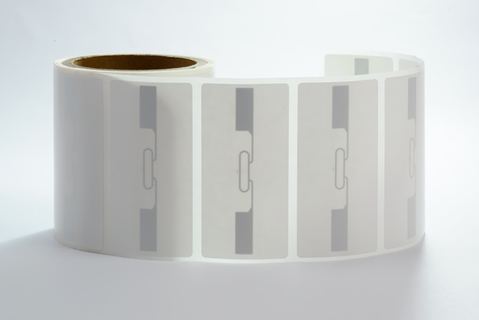
UHF RFID label · 100×50 mm · NXP UCODE 9 (RT-L151)
100 × 50 mm UCODE 9 label for an identification payload within 96-bit EPC memory.
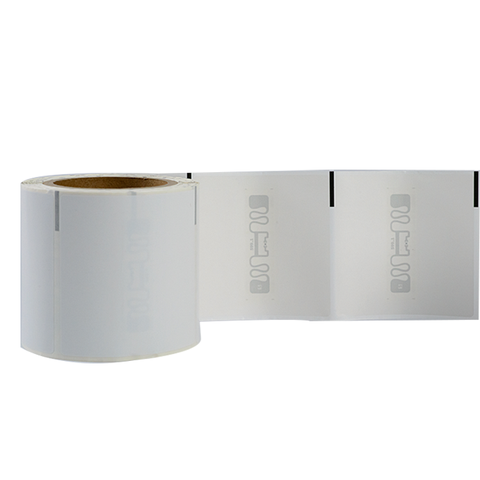
Logistics UHF RFID label · 100×100 mm · Impinj M730 (RT-L143)
100 × 100 mm M730 label with 128-bit EPC memory and a larger printable face.
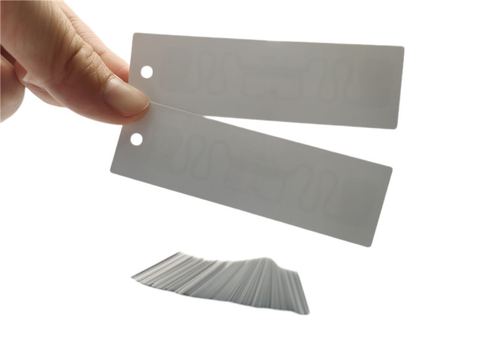
Apparel UHF RFID hang tag · 83×25 mm · Impinj M730 (RT-G101)
Printed apparel hang tag format for combined artwork and item identification.
Technical references
This guide combines the published Rivotag catalogue specifications with the primary technical references below. Product selection still depends on your item and reading setup.