Start here
Start with the installed readers and data model. Then approve the finished label, encoded record and real book or file tests before ordering for the whole collection.
1. Map the installed readers and software
List the circulation desk, self-checkout station, return system, inventory reader and security gate separately. Send their models, supported tag protocols and software requirements. The catalogue includes HF ISO/IEC 15693 / ISO/IEC 18000-3 Mode 1 and UHF ISO/IEC 18000-6C / EPCglobal Class 1 Gen 2 constructions. Choose a supported interface before comparing label sizes; do not assume that an HF installation can use a UHF label without a system review.
ISO 28560-1:2023 describes library data and implementation concerns. If your project follows this series, specify the required part, edition, encoding profile and vendor implementation. Ask the system supplier to approve the proposed data and tests. An air-interface protocol or chip name alone does not establish compliance with a library data profile or compatibility with your circulation software.
- Include every reader type and any existing tag or encoded-record example.
- State whether the collection will mix legacy and new tags during rollout.
- For a UHF proposal, give the deployment countries and required reader band; confirm the finished tag configuration rather than inferring its band from the IC.
Reference: ISO 28560-1:2023: library data and implementation guidelines overview.
2. Approve the finished format and tag position
The linked catalogue lists RT-S123 as a 49 × 81 mm HF label and RT-S143 as a 95 × 3 mm UHF label. Confirm the finished drawing, face material, adhesive, liner and print area. A narrow size does not prove that the label is invisible, resistant to removal or suitable for every book binding.
RT-S102 is a different purchasing starting point: a dry inlay with a listed 42 × 16 mm antenna. That antenna dimension is not a finished adhesive-label size. Review the converted construction and its total dimensions before selecting it for a book or file. Its baseline technical entry names UCODE 8; approve any alternative chip explicitly rather than using the historical URL as a chip specification.
- Send book or folder dimensions and photos with the proposed tag position marked.
- Include thin and thick covers, foil layers, metal fasteners, plastic sleeves and archive boxes that occur in the collection.
- Have the library or archive approve placement and any adhesive or material requirements before applying pilot tags.
3. Approve one complete encoded item record
Provide a sample item record showing the printed barcode or collection ID, required encoded values and the expected software result. Confirm the data format, field lengths, identity mapping and permitted write or lock operations with the system supplier. Use approved collection-item examples for the trial; borrower-data handling belongs in the system’s agreed privacy and access design.
For the listed SLIX2, NXP specifies 2560 accessible bits in 80 four-byte blocks. Ordinary user data occupies blocks 0–78: 2528 bits, or 316 bytes. Block 79 contains the counter and flags, not another ordinary data block. The separate 64-bit factory-programmed UID is fixed and is not a UHF TID. Approve the payload and access settings within that map.
The listed UCODE 9 has 96-bit EPC and no user memory; UCODE 8 has 128-bit EPC and no user memory. Both have a 96-bit factory-locked TID containing a 48-bit serial number. EPC encoding and TID readback or mapping are different order requirements. Confirm that your software can use the proposed identifier and memory layout before choosing either UHF construction.
Reference: NXP ICODE SLIX2 datasheet: memory map and UID (PDF).
4. Test desk transactions and realistic stacks
Apply samples to representative books and files. Check a single item, normal return stacks, mixed thicknesses and difficult orientations using the intended station and software. Keep nearby items in realistic positions so the test also reveals reads outside the intended transaction zone.
Prepare an expected item list for each test and set a capture window. Record missed items, repeated events, unexpected items and any incorrect record mapping. Verify that the printed ID and decoded data point to the same collection record, then check the required issue, return and exception-handling steps. A chip’s multi-item capability does not guarantee a complete stack transaction in your installation.
- Record the model, supplied chip, finished format and position of each sample.
- Record the reader, antenna, settings, item count, arrangement and capture time.
- Repeat difficult cases before accepting the construction or station configuration.
5. Test shelf inventory and security gates separately
For inventory, use the normal shelf density, archive-box arrangement, reader route and operator approach. Include adjacent shelves, metal fasteners and mixed item materials. Define the required capture time and acceptable missed or unwanted reads; a catalogue size or open-air read does not establish complete shelf coverage.
For a security gate, ask the system supplier to specify how the selected tag and its configured state interact with the reader and loan-status software. Trial the approved issued, returned and exception cases, including nearby items and the required approaches. A tag identifier alone does not decide whether a loan is authorized or provide an anti-theft guarantee.
If phone interaction is required, define it as a separate test. The NFC Forum Type 5 overview describes NFC-V detection and NDEF reading and writing. A library data record is not automatically a phone-ready NDEF experience; confirm the supplied tag format, phone and application. An immutable chip identity also does not, by itself, prove a book’s authenticity or secure borrower data.
Reference: NFC Forum Type 5 Tag Specification overview.
6. Send the collection and sample brief
Send the reader and software details, required protocol and data profile, item photos, tag space, pilot and full-collection quantities, and an example encoded record with its expected decoded result. Add the deployment and delivery countries, printing requirements, required date and any legacy-tag migration constraints.
For an inlay or custom label, include the finished drawing, face material, adhesive and converter requirements. For in-house printing or encoding, give the exact equipment, media and roll requirements. Ask the supplier to identify the final chip and construction and the proposed sample acceptance checks.
Confirm sample availability and fees, minimum quantity, pricing, freight, production and dispatch timing in the quotation. Approve the pilot record, placement and system results before scaling to the collection, and record the approved configuration for repeat orders.
Three catalogue starting points for a system review
These examples cover an HF label, a narrow UHF label and a UHF inlay for conversion. They are different procurement formats, not a ranking of speed, range or security.
| Model | Listed format / dimension | Interface | Listed IC | Memory for the named IC | First approval check |
|---|---|---|---|---|---|
| RT-S123 | HF label · 49 × 81 mm | ISO/IEC 15693; ISO/IEC 18000-3 Mode 1 | NXP ICODE SLIX2 | 2528-bit ordinary user data; counter block separate; 64-bit UID | HF reader, data profile and approved book or file placement. |
| RT-S143 | UHF label · 95 × 3 mm catalogue size | ISO/IEC 18000-6C / Gen 2; finished band to confirm | NXP UCODE 9 | 96-bit EPC / 0-bit user memory | Finished drawing, operating band and EPC-to-record mapping. |
| RT-S102 | Dry inlay · 42 × 16 mm antenna | ISO/IEC 18000-6C / Gen 2; listed 860–960 MHz | NXP UCODE 8 baseline | 128-bit EPC / 0-bit user memory | Converted label dimensions, adhesive and confirmed supplied chip. |
Formats, dimensions and the stated RT-S102 band come from the linked catalogue entries. NXP documents the named chip memory, not the finished label’s adhesion, range or system compatibility. RT-S143 has no finished operating-band entry here; request it. Approve the final drawing, configuration and installed samples before ordering.
Explore the catalogue options
Check these product specifications against your installed system. Request the supplied chip, finished construction and sample data before treating a catalogue candidate as compatible.
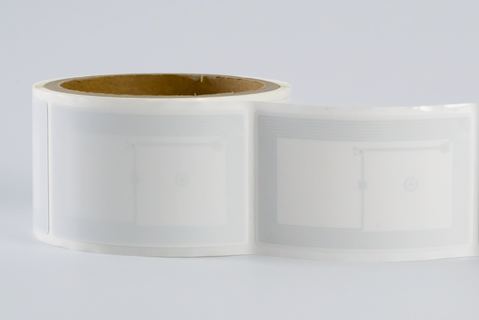
Library HF RFID label · 49×81 mm · ICODE SLIX2 (RT-S123)
A listed 49 × 81 mm HF label with SLIX2 for a supported-reader and data-profile review.
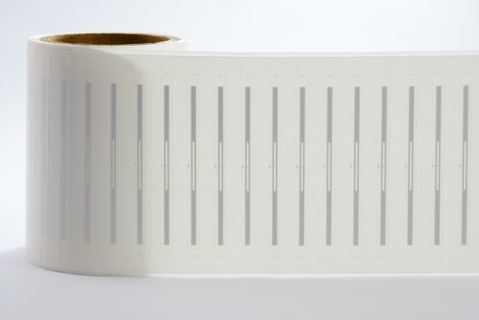
Library UHF RFID label · NXP UCODE 9 (RT-S143)
A listed 95 × 3 mm UHF label with UCODE 9; confirm the finished drawing and system encoding.
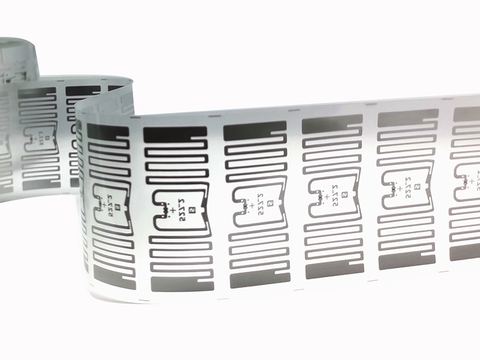
UHF RFID dry inlay · 42×16 mm antenna (RT-S102)
A dry inlay with a listed 42 × 16 mm antenna and UCODE 8 baseline for converter and finished-label review.
Technical references
NXP documents the specified chip interfaces, memory and identity fields. NFC Forum and ISO provide public overviews of phone-tag and library-data specifications; these overviews are not implementation approval or certification for the catalogue products. Finished formats and dimensions come from the linked Rivotag entries, and system acceptance requires your supplier’s configuration review and sample tests.