Start here
For direct metal mounting, start with a tag designed for that surface. Then choose the format around available space, printing, attachment and the reader band you will actually use.
1. Specify direct metal mounting explicitly
Metal changes the RF environment around an ordinary UHF label. A tag that reads before application can become difficult to read on a steel cabinet or tool. Ask for a finished construction intended for direct metal mounting instead of assuming that a general-purpose label will work.
Describe the complete asset: flat painted steel, bare aluminum, a curved pipe, a recessed equipment panel or a mixed metal-and-plastic enclosure. Include the proposed location and any clearance constraints. A thin label and a rigid housing solve different mechanical problems even when both are sold as on-metal RFID.
Reference: Zebra RFID programming guide.
2. Decide between a flexible label and a rigid tag
A flexible printable label is a useful starting point for assets that need a visible barcode or ID without a bulky housing. In this catalogue, RT-M110 is 0.75 mm thick and RT-M105 is 1 mm thick, both with a 65 × 35 mm PET face. Include the full tag thickness in printer and installation checks.
A rigid format may fit better when attachment needs screws or the label sits on an exposed asset. RT-S129 has an 85 × 20 mm footprint, an 11.5 mm thickness and adhesive-or-screw mounting options. Check that the housing and fixings fit the location and that the mounting method is suitable for the asset owner’s process.
- For curved surfaces, sample the actual radius and check for edge lifting.
- For tight clearances, measure the complete tag and its attachment stack.
- For on-demand printing, confirm the exact RFID printer and compatible roll construction.
Reference: Zebra RFID inlay placement guidelines.
3. Check the band and data requirement separately
On-metal does not describe the frequency band. RT-M110 and RT-S129 are listed at 902–928 MHz; RT-M105 is listed at 860–960 MHz. Specify the deployment country and reader band in the RFQ so the proposed tag can be checked against them.
Memory is another independent choice. RT-M110 has a 96-bit EPC and no user memory; RT-M105 has a 128-bit EPC and no user memory. RT-S129 is listed with a 128-bit EPC and 512-bit user memory. Choose additional user memory only when your application needs data stored on the tag and your reader software will use it.
Reference: Impinj M700 and M800 series encoding recommendations.
4. Test the installed asset in its normal position
An open-air tag test does not answer an on-metal question. Attach each candidate to the asset, place it where it normally lives, and read it using the intended handheld or fixed reader. Shelving, adjacent metal and an operator’s approach can affect which tag position is practical.
Treat listed read distances as measurements from a particular test setup. Request the mounting surface, reader type, frequency and power conditions behind a range claim. Use your own required distance and capture time as the acceptance criteria; comparing headline distances from different setups is not a controlled comparison.
- Keep reader settings fixed while comparing sample constructions.
- Test expected approaches and orientations, including the difficult ones.
- Read assets in a populated rack or storage area, not only one isolated item.
- Check attachment after cleaning, handling and environmental exposure relevant to your site.
Flexible and rigid options at a glance
All three examples are intended for metal applications. Their mechanical format, frequency and memory differ.
| Model | Dimensions | Listed frequency | EPC / user memory |
|---|---|---|---|
| RT-M110 · flexible PET | 65 × 35 × 0.75 mm | 902–928 MHz | 96 / 0 bits |
| RT-M105 · flexible PET | 65 × 35 × 1 mm | 860–960 MHz | 128 / 0 bits |
| RT-S129 · rigid ABS | 85 × 20 × 11.5 mm | 902–928 MHz | 128 / 512 bits |
These are published catalogue specifications, not a performance ranking. Confirm the required band, printer compatibility and final mounting conditions when requesting samples.
Explore the catalogue options
Use these product specifications to prepare your shortlist. Confirm the final construction in your quotation and sample approval.
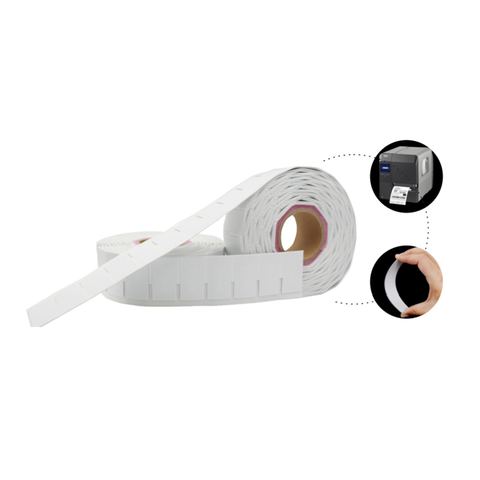
Printable UHF flexible on-metal RFID label · 65×35 mm · Impinj Monza R6 (RT-M110)
A 0.75 mm PET construction to evaluate when clearance and printing matter.
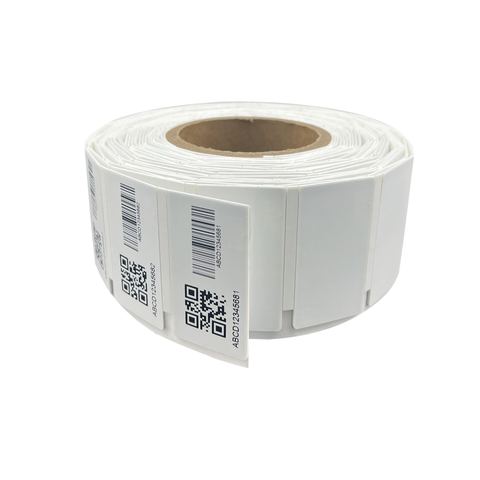
UHF flexible on-metal RFID label · 65×35 mm · Impinj M830 (RT-M105)
A 1 mm flexible label with M830 and a listed 860–960 MHz frequency range.
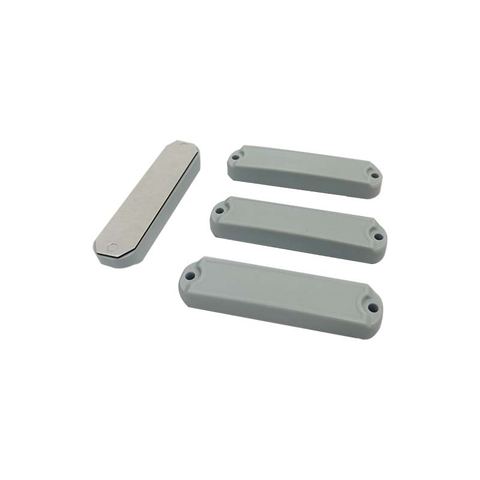
On Metal UHF RFID tag · 85×20 mm (RT-S129)
A rigid ABS format with adhesive-or-screw mounting and 512-bit user memory.
Technical references
This guide combines the published Rivotag catalogue specifications with the primary technical references below. Product selection still depends on your item and reading setup.